qihaiyan
 Overview
Example https://github.com/qihaiyan/jwt-boot-auth
Spring Boot makes it very convenient to develop RESTful APIs. In production, it is essential to protect the published APIs with authorization. In this article we will look at how to use JWT to add authorization to an API, ensuring that only authorized users can access it.
Building a Simple API
Spring provides a web page for conveniently generating a Spring Boot project.
As shown in the image below, select H2, Web, Security, and JPA under “Search for dependencies”; these dependencies are used in our example project.
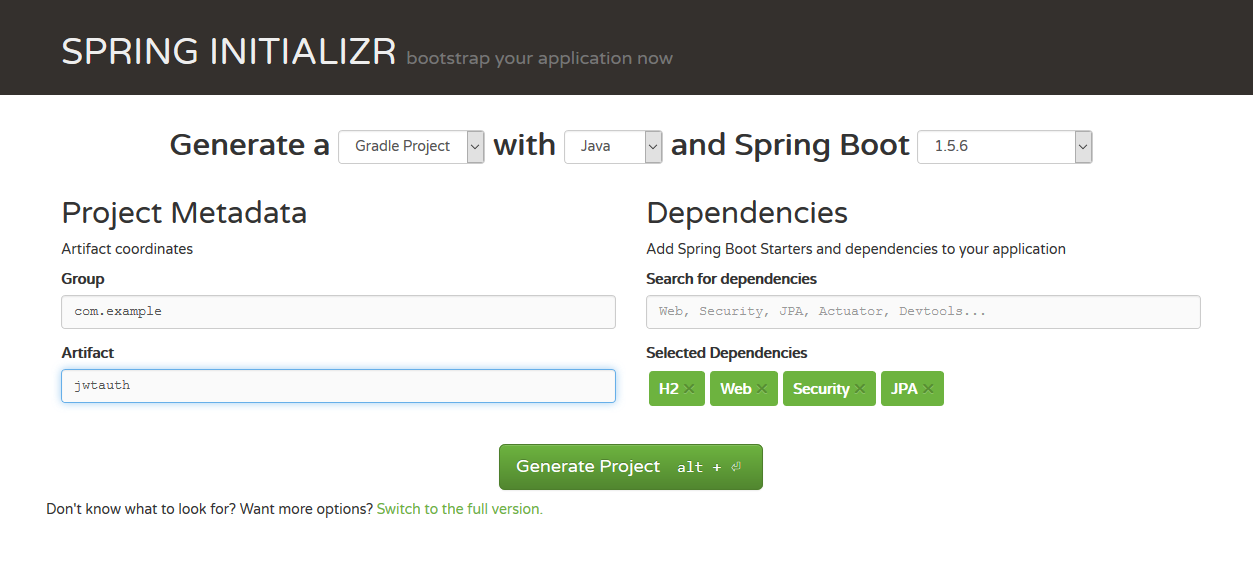
Click the Generate Project button and download the file to your local machine.
Add a method to JwtauthApplication.java:
@RequestMapping("/hello")
@ResponseBody
public String hello(){
  return "hello";
}
With that, a simple RESTful API is ready.
Now let’s run the application to see the result. Open a command line tool and run:
cd jwtauth
gradle bootRun
Once the application has started, you can simply call the API with curl:
curl http://localhost:8080/tasks
At this point our API is complete. However, it has no authorization protection at all — anyone can access it, which is insecure. Next we will add an authorization mechanism.
Adding User Registration
First, add an entity class MyUser:
package com.example.jwtauth;

import javax.persistence.Entity;
import javax.persistence.GeneratedValue;
import javax.persistence.GenerationType;
import javax.persistence.Id;

@Entity
public class MyUser {
    @Id
    @GeneratedValue(strategy = GenerationType.IDENTITY)
    private long id;
    private String username;
    private String password;

    public long getId() {
        return id;
    }

    public String getUsername() {
        return username;
    }

    public void setUsername(String username) {
        this.username = username;
    }

    public String getPassword() {
        return password;
    }

    public void setPassword(String password) {
        this.password = password;
    }
}
Then add a repository interface MyUserRepository for reading and saving user information:
package com.example.jwtauth;

import org.springframework.data.jpa.repository.JpaRepository;

public interface MyUserRepository extends JpaRepository<MyUser, Long> {
    MyUser findByUsername(String username);
}
Thanks to Spring Data JPA, simply defining an interface gives us full CRUD capability for our data. Since we included H2 in build.gradle, we also have a local database — no configuration is needed and Spring Boot uses it automatically. Spring Boot really does take a huge amount of work off the developer’s hands.
Next, add a UserController class that implements the user registration endpoint:
package com.example.jwtauth;

import org.springframework.security.crypto.bcrypt.BCryptPasswordEncoder;
import org.springframework.web.bind.annotation.PostMapping;
import org.springframework.web.bind.annotation.RequestBody;
import org.springframework.web.bind.annotation.RequestMapping;
import org.springframework.web.bind.annotation.RestController;

@RestController
@RequestMapping("/users")
public class UserController {

    private MyUserRepository applicationUserRepository;
    private BCryptPasswordEncoder bCryptPasswordEncoder;

    public UserController(MyUserRepository myUserRepository,
                          BCryptPasswordEncoder bCryptPasswordEncoder) {
        this.applicationUserRepository = myUserRepository;
        this.bCryptPasswordEncoder = bCryptPasswordEncoder;
    }

    @PostMapping("/signup")
    public void signUp(@RequestBody MyUser user) {
        user.setPassword(bCryptPasswordEncoder.encode(user.getPassword()));
        applicationUserRepository.save(user);
    }
}
The
@PostMapping("/signup")
annotation defines the user registration endpoint and specifies the URL as /users/signup. Since the class is annotated with @RequestMapping(“/users”), the URLs of all methods in the class get the /users prefix, so the method only needs to specify the /signup sub-path.
Passwords are encrypted with BCryptPasswordEncoder, so we add the BCryptPasswordEncoder bean definition in the Application class.
@SpringBootApplication
@RestController
public class JwtauthApplication {
	@Bean
	public BCryptPasswordEncoder bCryptPasswordEncoder() {
		return new BCryptPasswordEncoder();
	}
  // ...
Adding JWT Authentication
After a user enters a username and password, they are compared against the user information stored in the database; if they match, authentication succeeds. The traditional approach is to create a session after successful authentication and return a cookie to the client. Here we use JWT to handle username and password authentication instead. The difference is that after successful authentication, the server generates a token and returns it to the client, and every subsequent request from the client must carry that token in the HTTP header. When the server receives a request, it verifies the token’s validity. Verification includes:
-
Checking that the content is a valid JWT
-
Verifying the signature
-
Verifying the claims
-
Checking the permissions
Handling Login
Create a class JWTLoginFilter. Its core job is to generate a token after the username and password are verified, and return the token to the client:
package com.example.jwtauth;

import com.fasterxml.jackson.databind.ObjectMapper;
import io.jsonwebtoken.Jwts;
import io.jsonwebtoken.SignatureAlgorithm;
import org.springframework.security.authentication.AuthenticationManager;
import org.springframework.security.authentication.UsernamePasswordAuthenticationToken;
import org.springframework.security.core.Authentication;
import org.springframework.security.core.AuthenticationException;
import org.springframework.security.core.userdetails.User;
import org.springframework.security.web.authentication.UsernamePasswordAuthenticationFilter;

import javax.servlet.FilterChain;
import javax.servlet.ServletException;
import javax.servlet.http.HttpServletRequest;
import javax.servlet.http.HttpServletResponse;
import java.io.IOException;
import java.util.ArrayList;
import java.util.Date;

public class JWTLoginFilter extends UsernamePasswordAuthenticationFilter {
    private AuthenticationManager authenticationManager;

    public JWTLoginFilter(AuthenticationManager authenticationManager) {
        this.authenticationManager = authenticationManager;
    }

    @Override
    public Authentication attemptAuthentication(HttpServletRequest req,
                                                HttpServletResponse res) throws AuthenticationException {
        try {
            MyUser user = new ObjectMapper()
                    .readValue(req.getInputStream(), MyUser.class);

            return authenticationManager.authenticate(
                    new UsernamePasswordAuthenticationToken(
                            user.getUsername(),
                            user.getPassword(),
                            new ArrayList<>())
            );
        } catch (IOException e) {
            throw new RuntimeException(e);
        }
    }

    @Override
    protected void successfulAuthentication(HttpServletRequest req,
                                            HttpServletResponse res,
                                            FilterChain chain,
                                            Authentication auth) throws IOException, ServletException {

        String token = Jwts.builder()
                .setSubject(((User) auth.getPrincipal()).getUsername())
                .setExpiration(new Date(System.currentTimeMillis() + 60 * 60 * 24 * 1000))
                .signWith(SignatureAlgorithm.HS512, "MyJwtSecret")
                .compact();
        res.addHeader("Authorization", "Bearer " + token);
    }
}
This class extends UsernamePasswordAuthenticationFilter and overrides two of its methods:
attemptAuthentication: receives and parses the user’s credentials.
successfulAuthentication: called after the user logs in successfully; we generate the token in this method.
Token Verification
Once the user logs in successfully, they receive a token, and every subsequent request carries it; the server verifies the token’s validity.
Create a JwtAuthenticationFilter class in which we implement the token validation logic.
package com.example.jwtauth;

import io.jsonwebtoken.Jwts;
import org.springframework.security.authentication.AuthenticationManager;
import org.springframework.security.authentication.UsernamePasswordAuthenticationToken;
import org.springframework.security.core.context.SecurityContextHolder;
import org.springframework.security.web.authentication.www.BasicAuthenticationFilter;

import javax.servlet.FilterChain;
import javax.servlet.ServletException;
import javax.servlet.http.HttpServletRequest;
import javax.servlet.http.HttpServletResponse;
import java.io.IOException;
import java.util.ArrayList;

public class JwtAuthenticationFilter extends BasicAuthenticationFilter {
    public JwtAuthenticationFilter(AuthenticationManager authManager) {
        super(authManager);
    }

    @Override
    protected void doFilterInternal(HttpServletRequest req,
                                    HttpServletResponse res,
                                    FilterChain chain) throws IOException, ServletException {
        String header = req.getHeader("Authorization");

        if (header == null || !header.startsWith("Bearer ")) {
            chain.doFilter(req, res);
            return;
        }

        UsernamePasswordAuthenticationToken authentication = getAuthentication(req);

        SecurityContextHolder.getContext().setAuthentication(authentication);
        chain.doFilter(req, res);
    }

    private UsernamePasswordAuthenticationToken getAuthentication(HttpServletRequest request) {
        String token = request.getHeader("Authorization");
        if (token != null) {
            // parse the token.
            String user = Jwts.parser()
                    .setSigningKey("MyJwtSecret")
                    .parseClaimsJws(token.replace("Bearer ", ""))
                    .getBody()
                    .getSubject();

            if (user != null) {
                return new UsernamePasswordAuthenticationToken(user, null, new ArrayList<>());
            }
            return null;
        }
        return null;
    }
}
This class extends BasicAuthenticationFilter. In the doFilterInternal method, it reads the token from the Authorization entry of the HTTP header and then validates the token’s validity with the methods provided by the Jwts library. If validation passes, the request is treated as an authorized, legitimate request.
Spring Security Configuration
The Spring Security configuration wires the pieces above together.
package com.example.jwtauth;

import org.springframework.boot.autoconfigure.security.SecurityProperties;
import org.springframework.context.annotation.Configuration;
import org.springframework.core.annotation.Order;
import org.springframework.http.HttpMethod;
import org.springframework.security.config.annotation.authentication.builders.AuthenticationManagerBuilder;
import org.springframework.security.config.annotation.web.builders.HttpSecurity;
import org.springframework.security.config.annotation.web.configuration.EnableWebSecurity;
import org.springframework.security.config.annotation.web.configuration.WebSecurityConfigurerAdapter;
import org.springframework.security.core.userdetails.UserDetailsService;
import org.springframework.security.crypto.bcrypt.BCryptPasswordEncoder;

@Configuration
@Order(SecurityProperties.ACCESS_OVERRIDE_ORDER)
public class MyWebSecurityConfig extends WebSecurityConfigurerAdapter {
    private UserDetailsService userDetailsService;
    private BCryptPasswordEncoder bCryptPasswordEncoder;

    public MyWebSecurityConfig(UserDetailsService userDetailsService, BCryptPasswordEncoder bCryptPasswordEncoder) {
        this.userDetailsService = userDetailsService;
        this.bCryptPasswordEncoder = bCryptPasswordEncoder;
    }

    @Override
    protected void configure(HttpSecurity http) throws Exception {
        http.cors().and().csrf().disable().authorizeRequests()
                .antMatchers(HttpMethod.POST, "/users/signup").permitAll()
                .anyRequest().authenticated()
                .and()
                .addFilter(new JWTLoginFilter(authenticationManager()))
                .addFilter(new JwtAuthenticationFilter(authenticationManager()));
    }

    @Override
    public void configure(AuthenticationManagerBuilder auth) throws Exception {
        auth.userDetailsService(userDetailsService).passwordEncoder(bCryptPasswordEncoder);
    }
}
This is standard Spring Security configuration, so I won’t go into the details. Note these two lines
.addFilter(new JWTLoginFilter(authenticationManager()))
.addFilter(new JwtAuthenticationFilter(authenticationManager()))
which add the JWT filters we defined to the Spring Security processing flow.
Now let’s do a simple verification of our application:
# Request the hello endpoint; a 403 error is returned
curl http://localhost:8080/hello

# Register a new user
curl -H "Content-Type: application/json" -X POST -d '{
    "username": "admin",
    "password": "password"
}' http://localhost:8080/users/signup

# Log in; a token is returned. In the HTTP header, the part after "Authorization: Bearer" is the token
curl -i -H "Content-Type: application/json" -X POST -d '{
    "username": "admin",
    "password": "password"
}' http://localhost:8080/login

# Request the hello endpoint again with the token obtained from the successful login
# Replace XXXXXX in the request with the token you obtained
# This time the call succeeds
curl -H "Content-Type: application/json" \
-H "Authorization: Bearer XXXXXX" \
"http://localhost:8080/hello"
Summary
That’s it — JWT authentication for a Spring Boot API is now in place. The process is not complicated: it mainly comes down to writing two Spring Security filters, one to generate and one to validate the JWT token.
As a stateless authentication and authorization technology, JWT is a great fit for distributed system architectures: the server does not need to store user state, so there is no need to use technologies such as Redis to share session data between service nodes.
 程序常驻后台运行的原理和方法