qihaiyan
 概述
示例 https://github.com/qihaiyan/jwt-boot-auth(示例代码已按本文使用的新版本更新)
本文最早写于 2017 年,已针对 Spring Boot 3.x/4.x + Spring Security 6/7 全面更新:安全配置改用 SecurityFilterChain 与 lambda DSL,JWT 库升级到 JJWT 0.12+,servlet 相关 API 迁移到 jakarta。
用spring-boot开发RESTful API非常的方便,在生产环境中,对发布的API增加授权保护是非常必要的。现在我们来看如何利用JWT技术为API增加授权保护,保证只有获得授权的用户才能够访问API。
开发一个简单的API
spring提供了一个网页可以便捷的生成springboot程序。
如图:在Search for dependencies中选择H2、Web、Security、JPA,这几个依赖在我们的示例工程中会用到。
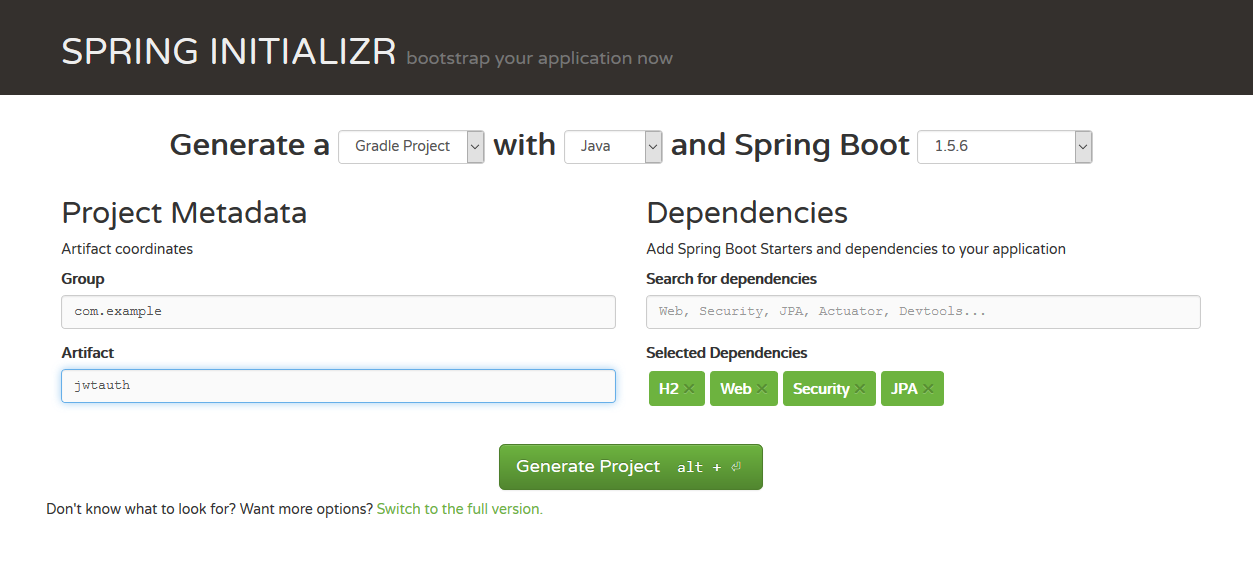
点击Generate Project按钮后,下载文件到本地。
在JwtauthApplication.java中增加一个方法:
@RequestMapping("/hello")
@ResponseBody
public String hello(){
  return "hello";
}
这样一个简单的RESTful API就开发好了。
现在我们运行一下程序看看效果,打开命令行工具,执行:
cd jwtauth
gradle bootRun
等待程序启动完成后,可以简单的通过curl工具进行API的调用:
curl http://localhost:8080/hello
至此,我们的接口就开发完成了。但是这个接口没有任何授权防护,任何人都可以访问,这样是不安全的,下面我们开始加入授权机制。
增加用户注册功能
首先增加一个实体类MyUser:
package com.example.jwtauth;

import jakarta.persistence.Entity;
import jakarta.persistence.GeneratedValue;
import jakarta.persistence.GenerationType;
import jakarta.persistence.Id;

@Entity
public class MyUser {
    @Id
    @GeneratedValue(strategy = GenerationType.IDENTITY)
    private long id;
    private String username;
    private String password;

    public long getId() {
        return id;
    }

    public String getUsername() {
        return username;
    }

    public void setUsername(String username) {
        this.username = username;
    }

    public String getPassword() {
        return password;
    }

    public void setPassword(String password) {
        this.password = password;
    }
}
然后增加一个Repository类MyUserRepository,可以读取和保存用户信息:
package com.example.jwtauth;

import org.springframework.data.jpa.repository.JpaRepository;

public interface MyUserRepository extends JpaRepository<MyUser, Long> {
    MyUser findByUsername(String username);
}
得益于SpringDataJpa,只需要定义一个interface,就让我们拥有了数据的CRUD功能。由于我们在build.gradle中引入了H2,所以我们拥有了一个本地数据库,不需要做任何配置,springboot就会使用这个数据库,不得不说springboot确实极大的减轻了开发工作量。
下面增加一个类UserController,实现用户注册的接口:
package com.example.jwtauth;

import org.springframework.security.crypto.bcrypt.BCryptPasswordEncoder;
import org.springframework.web.bind.annotation.PostMapping;
import org.springframework.web.bind.annotation.RequestBody;
import org.springframework.web.bind.annotation.RequestMapping;
import org.springframework.web.bind.annotation.RestController;

@RestController
@RequestMapping("/users")
public class UserController {

    private MyUserRepository applicationUserRepository;
    private BCryptPasswordEncoder bCryptPasswordEncoder;

    public UserController(MyUserRepository myUserRepository,
                          BCryptPasswordEncoder bCryptPasswordEncoder) {
        this.applicationUserRepository = myUserRepository;
        this.bCryptPasswordEncoder = bCryptPasswordEncoder;
    }

    @PostMapping("/signup")
    public void signUp(@RequestBody MyUser user) {
        user.setPassword(bCryptPasswordEncoder.encode(user.getPassword()));
        applicationUserRepository.save(user);
    }
}
其中的
@PostMapping("/signup")
这个方法定义了用户注册接口,并且指定了url地址是/users/signup。由于类上加了注解 @RequestMapping(“/users”),类中的所有方法的url地址都会有/users前缀,所以在方法上只需指定/signup子路径即可。
密码采用了BCryptPasswordEncoder进行加密,我们在Application中增加BCryptPasswordEncoder实例的定义。
@SpringBootApplication
@RestController
public class JwtauthApplication {
	@Bean
	public BCryptPasswordEncoder bCryptPasswordEncoder() {
		return new BCryptPasswordEncoder();
	}
  // ...
增加JWT认证功能
用户填入用户名密码后,与数据库里存储的用户信息进行比对,如果通过,则认证成功。传统的方法是在认证通过后,创建sesstion,并给客户端返回cookie。现在我们采用JWT来处理用户名密码的认证。区别在于,认证通过后,服务器生成一个token,将token返回给客户端,客户端以后的所有请求都需要在http头中指定该token。服务器接收的请求后,会对token的合法性进行验证。验证的内容包括:
-
内容是一个正确的JWT格式
-
检查签名
-
检查claims
-
检查权限
下面开始具体的实现。我们使用JJWT库来生成和校验token,在build.gradle中加入如下依赖(Gradle现在统一使用implementation声明依赖,旧的compile写法已经废弃):
dependencies {
    implementation 'io.jsonwebtoken:jjwt-api:0.12.6'
    implementation 'io.jsonwebtoken:jjwt-impl:0.12.6'
    implementation 'io.jsonwebtoken:jjwt-jackson:0.12.6'
}
HS512算法要求密钥长度不能少于64字节,密钥太短的话,签发token时会抛出WeakKeyException。我们把一个足够长的密钥(Base64编码,解码后65字节)配置在application.yml中:
jwt:
  secret: Y2hhbmdlLXRoaXMtc2VjcmV0LWluLXByb2R1Y3Rpb24taXQtbXVzdC1iZS1sb25nLWVub3VnaC1mb3ItaHM1MTI=
处理登录
创建一个类JWTLoginFilter,核心功能是在验证用户名密码正确后,生成一个token,并将token返回给客户端:
package com.example.jwtauth;

import com.fasterxml.jackson.databind.ObjectMapper;
import io.jsonwebtoken.Jwts;
import io.jsonwebtoken.io.Decoders;
import io.jsonwebtoken.security.Keys;
import jakarta.servlet.FilterChain;
import jakarta.servlet.ServletException;
import jakarta.servlet.http.HttpServletRequest;
import jakarta.servlet.http.HttpServletResponse;
import org.springframework.security.authentication.AuthenticationManager;
import org.springframework.security.authentication.UsernamePasswordAuthenticationToken;
import org.springframework.security.core.Authentication;
import org.springframework.security.core.AuthenticationException;
import org.springframework.web.filter.OncePerRequestFilter;

import javax.crypto.SecretKey;
import java.io.IOException;
import java.util.Date;

public class JWTLoginFilter extends OncePerRequestFilter {

    private static final long EXPIRATION = 24 * 60 * 60 * 1000;

    private final AuthenticationManager authenticationManager;
    private final SecretKey secretKey;

    public JWTLoginFilter(AuthenticationManager authenticationManager, String secret) {
        this.authenticationManager = authenticationManager;
        this.secretKey = Keys.hmacShaKeyFor(Decoders.BASE64.decode(secret));
    }

    @Override
    protected void doFilterInternal(HttpServletRequest request,
                                    HttpServletResponse response,
                                    FilterChain filterChain) throws ServletException, IOException {
        if (!"POST".equals(request.getMethod()) || !"/login".equals(request.getServletPath())) {
            filterChain.doFilter(request, response);
            return;
        }

        try {
            MyUser user = new ObjectMapper()
                    .readValue(request.getInputStream(), MyUser.class);

            Authentication authentication = authenticationManager.authenticate(
                    new UsernamePasswordAuthenticationToken(
                            user.getUsername(),
                            user.getPassword()));

            String token = Jwts.builder()
                    .subject(authentication.getName())
                    .expiration(new Date(System.currentTimeMillis() + EXPIRATION))
                    .signWith(secretKey)
                    .compact();
            response.addHeader("Authorization", "Bearer " + token);
        } catch (AuthenticationException e) {
            response.setStatus(HttpServletResponse.SC_UNAUTHORIZED);
        }
    }
}
该类继承自OncePerRequestFilter,保证每个请求只会经过一次该过滤器。在doFilterInternal方法中,首先判断请求是否为POST /login,如果不是,说明这不是登录请求,直接交给后续的过滤器处理。
如果是登录请求,则从请求体中解析出用户名和密码,交给authenticationManager.authenticate进行认证,AuthenticationManager会调用UserDetailsService从数据库中加载用户,并用BCryptPasswordEncoder校验密码。认证通过后,我们在这个方法里生成token:subject为用户名,有效期24小时。signWith(secretKey)会根据密钥的长度自动选择签名算法,我们的密钥长度满足HS512的要求,因此使用HS512签名。生成的token通过http头的Authorization: Bearer返回给客户端;认证失败时返回401错误。
授权验证
用户一旦登录成功后,会拿到token,后续的请求都会带着这个token,服务端会验证token的合法性。
创建JwtAuthenticationFilter类,我们在这个类中实现token的校验功能。
package com.example.jwtauth;

import io.jsonwebtoken.JwtException;
import io.jsonwebtoken.Jwts;
import io.jsonwebtoken.io.Decoders;
import io.jsonwebtoken.security.Keys;
import jakarta.servlet.FilterChain;
import jakarta.servlet.ServletException;
import jakarta.servlet.http.HttpServletRequest;
import jakarta.servlet.http.HttpServletResponse;
import org.springframework.security.authentication.UsernamePasswordAuthenticationToken;
import org.springframework.security.core.context.SecurityContextHolder;
import org.springframework.web.filter.OncePerRequestFilter;

import javax.crypto.SecretKey;
import java.io.IOException;
import java.util.List;

public class JwtAuthenticationFilter extends OncePerRequestFilter {

    private final SecretKey secretKey;

    public JwtAuthenticationFilter(String secret) {
        this.secretKey = Keys.hmacShaKeyFor(Decoders.BASE64.decode(secret));
    }

    @Override
    protected void doFilterInternal(HttpServletRequest request,
                                    HttpServletResponse response,
                                    FilterChain filterChain) throws ServletException, IOException {
        String header = request.getHeader("Authorization");

        if (header == null || !header.startsWith("Bearer ")) {
            filterChain.doFilter(request, response);
            return;
        }

        UsernamePasswordAuthenticationToken authentication =
                getAuthentication(header.replace("Bearer ", ""));

        if (authentication != null) {
            SecurityContextHolder.getContext().setAuthentication(authentication);
        }
        filterChain.doFilter(request, response);
    }

    private UsernamePasswordAuthenticationToken getAuthentication(String token) {
        try {
            // parse the token.
            String user = Jwts.parser()
                    .verifyWith(secretKey)
                    .build()
                    .parseSignedClaims(token)
                    .getPayload()
                    .getSubject();

            if (user != null) {
                return new UsernamePasswordAuthenticationToken(user, null, List.of());
            }
        } catch (JwtException | IllegalArgumentException e) {
            // token无效或已过期,直接忽略,请求会在后续的授权检查中被拒绝
        }
        return null;
    }
}
该类同样继承自OncePerRequestFilter,在doFilterInternal方法中,从http头的Authorization 项读取token数据,然后用Jwts包提供的方法校验token的合法性:parseSignedClaims会检查签名和有效期,并解析出claims。如果校验通过,就把认证信息放入SecurityContextHolder,后续的授权检查会认为这是一个取得授权的合法请求;如果token无效或已过期,parseSignedClaims会抛出JwtException,这里直接忽略该异常,请求会在后续的授权检查中被拒绝。
SpringSecurity配置
通过SpringSecurity的配置,将上面的方法组合在一起。
在 Spring Security 6.0 中,以前常用的WebSecurityConfigurerAdapter已经被移除,antMatchers、and()链式写法也一并废弃,现在的写法是定义一个SecurityFilterChain bean,全部使用lambda DSL完成配置(antMatchers的替代方法是requestMatchers)。
package com.example.jwtauth;

import org.springframework.beans.factory.annotation.Value;
import org.springframework.context.annotation.Bean;
import org.springframework.context.annotation.Configuration;
import org.springframework.http.HttpMethod;
import org.springframework.security.authentication.AuthenticationManager;
import org.springframework.security.config.annotation.authentication.configuration.AuthenticationConfiguration;
import org.springframework.security.config.annotation.web.builders.HttpSecurity;
import org.springframework.security.config.annotation.web.configuration.EnableWebSecurity;
import org.springframework.security.config.annotation.web.configurers.AbstractHttpConfigurer;
import org.springframework.security.config.http.SessionCreationPolicy;
import org.springframework.security.core.userdetails.User;
import org.springframework.security.core.userdetails.UserDetailsService;
import org.springframework.security.core.userdetails.UsernameNotFoundException;
import org.springframework.security.web.SecurityFilterChain;
import org.springframework.security.web.authentication.UsernamePasswordAuthenticationFilter;

import static org.springframework.security.config.Customizer.withDefaults;

@Configuration
@EnableWebSecurity
public class MyWebSecurityConfig {

    @Bean
    public UserDetailsService userDetailsService(MyUserRepository myUserRepository) {
        return username -> {
            MyUser myUser = myUserRepository.findByUsername(username);
            if (myUser == null) {
                throw new UsernameNotFoundException("用户不存在: " + username);
            }
            return User.withUsername(myUser.getUsername())
                    .password(myUser.getPassword())
                    .roles("USER")
                    .build();
        };
    }

    @Bean
    public AuthenticationManager authenticationManager(
            AuthenticationConfiguration authenticationConfiguration) throws Exception {
        return authenticationConfiguration.getAuthenticationManager();
    }

    @Bean
    public SecurityFilterChain securityFilterChain(HttpSecurity http,
                                                   AuthenticationManager authenticationManager,
                                                   @Value("${jwt.secret}") String secret) throws Exception {
        http
                .cors(withDefaults())
                .csrf(AbstractHttpConfigurer::disable)
                .sessionManagement(session ->
                        session.sessionCreationPolicy(SessionCreationPolicy.STATELESS))
                .authorizeHttpRequests(auth -> auth
                        .requestMatchers(HttpMethod.POST, "/users/signup").permitAll()
                        .anyRequest().authenticated())
                .addFilterBefore(new JWTLoginFilter(authenticationManager, secret),
                        UsernamePasswordAuthenticationFilter.class)
                .addFilterBefore(new JwtAuthenticationFilter(secret),
                        UsernamePasswordAuthenticationFilter.class);
        return http.build();
    }
}
配置类里定义了3个bean:
-
UserDetailsService:从数据库中加载用户。有了这个bean,再配合前面定义的BCryptPasswordEncoder bean,Spring Security会自动用它们构建DaoAuthenticationProvider,完成用户名密码的认证,替代了以前重写configure(AuthenticationManagerBuilder)的写法。
-
AuthenticationManager:从AuthenticationConfiguration中获取并暴露为bean,供登录过滤器使用。
-
SecurityFilterChain:把前面的配置组合在一起。注意其中的
.addFilterBefore(new JWTLoginFilter(authenticationManager, secret), UsernamePasswordAuthenticationFilter.class)
.addFilterBefore(new JwtAuthenticationFilter(secret), UsernamePasswordAuthenticationFilter.class)
这两行,将我们定义的JWT过滤器加入SpringSecurity的处理流程中。由于JWT是无状态的,这里同时把session创建策略设置为STATELESS。
下面对我们的程序进行简单的验证:
# 请求hello接口,会收到403错误
curl http://localhost:8080/hello

# 注册一个新用户
curl -H "Content-Type: application/json" -X POST -d '{
    "username": "admin",
    "password": "password"
}' http://localhost:8080/users/signup

# 登录,会返回token,在http header中,Authorization: Bearer 后面的部分就是token
curl -i -H "Content-Type: application/json" -X POST -d '{
    "username": "admin",
    "password": "password"
}' http://localhost:8080/login

# 用登录成功后拿到的token再次请求hello接口
# 将请求中的XXXXXX替换成拿到的token
# 这次可以成功调用接口了
curl -H "Content-Type: application/json" \
-H "Authorization: Bearer XXXXXX" \
"http://localhost:8080/hello"
总结
至此,给SpringBoot的接口加上JWT认证的功能就实现了,过程并不复杂,主要是开发两个SpringSecurity的filter,来生成和校验JWT token。
JWT作为一个无状态的认证授权技术,非常适合于分布式系统架构,因为服务端不需要保存用户状态,因此就无需采用redis等技术,在各个服务节点之间共享session数据。
 程序常驻后台运行的原理和方法