qihaiyan
 (Original: /oauth2/index.html)
demo: https://github.com/qihaiyan/ng-boot-oauth
OAuth 2.0 Tutorial
OAuth 2.0 is an open standard protocol that allows an application to access user-authorized data from other applications. For example, a game can retrieve user information from Facebook, or a location-based application can retrieve user information from Foursquare. Here is an illustration:
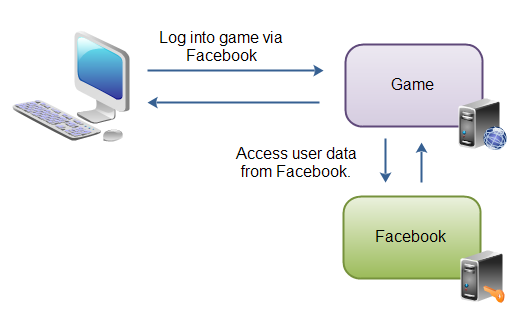
First, the user enters the game’s web application, which asks the user to log in with a Facebook account and redirects to the Facebook login page. After the user logs in to Facebook, they are redirected back to the game application. At this point the application has obtained the user’s Facebook user data and authorization.
OAuth 2.0 Use Cases
OAuth 2.0 can be used both to access user information in other applications from within an application, and to provide user authorization services for other applications to call. OAuth 2.0 is the replacement for OAuth 1.0, which was too complicated — for example, OAuth 1.0 required the use of certificates. OAuth 2.0 is much simpler: it does not require certificates and relies only on SSL/TLS.
OAuth 2.0 Specification
The purpose of this tutorial is to provide an overview of the OAuth 2.0 protocol to aid understanding, not to cover every detail of it. If you plan to implement the OAuth 2.0 protocol, it is best to read the detailed specification, available at: https://datatracker.ietf.org/doc/html/rfc6749
OAuth 2.0 Overview
As mentioned in the introduction, OAuth 2.0 is an open standard that allows an application to access user-authorized data from other applications. Now let’s look at how this protocol works and at the various concepts mentioned in the specification.
OAuth 2.0 provides different ways to obtain permission to access resources on a resource server. Here we describe the most secure and most commonly used one: how a web application requests access to another web application.
The following diagram describes the entire process:
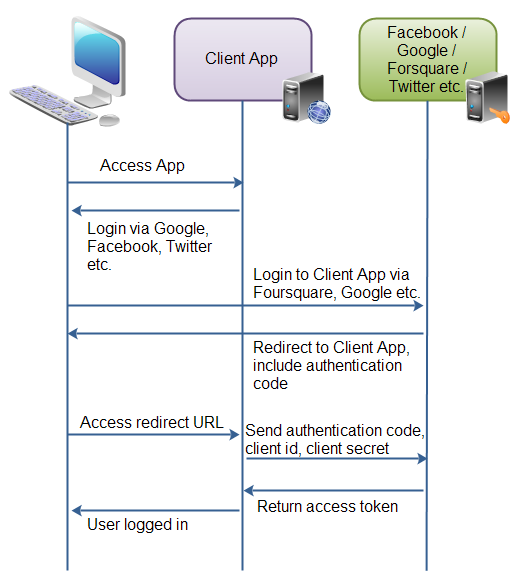 First, the user visits the client application, which has a “Log in with Facebook” button.
Second, when the user clicks this button, they are redirected to the authorization server (Facebook). The user then logs in, and after a successful login is asked whether the client application may use their information. The user clicks the confirm button.
Third, the authorization server redirects the user to the URL provided by the client application. This redirect URL is usually registered with the authorization server by the owner of the client application. After registration, the authorization server generates a client id and a client password. The redirect URL carries a code parameter that identifies this authorization session.
Fourth, once the redirect completes, the user lands on the redirected page, while the client application communicates with the authorization server in the background, sending the client id, client password, and the code obtained in the previous step to the authorization server, which responds with an access token.
Once the client application has the access token, it can use it to access the relevant resources provided by Facebook.
First, the user visits the client application, which has a “Log in with Facebook” button.
Second, when the user clicks this button, they are redirected to the authorization server (Facebook). The user then logs in, and after a successful login is asked whether the client application may use their information. The user clicks the confirm button.
Third, the authorization server redirects the user to the URL provided by the client application. This redirect URL is usually registered with the authorization server by the owner of the client application. After registration, the authorization server generates a client id and a client password. The redirect URL carries a code parameter that identifies this authorization session.
Fourth, once the redirect completes, the user lands on the redirected page, while the client application communicates with the authorization server in the background, sending the client id, client password, and the code obtained in the previous step to the authorization server, which responds with an access token.
Once the client application has the access token, it can use it to access the relevant resources provided by Facebook.
OAuth 2.0 Application Roles
OAuth 2.0 defines the following application roles:
Resource Owner
Resource Server
Client Application
Authorization Server  The Resource Owner is the owner of the data. For example, a user on Facebook or Google is a Resource Owner, and the resources they own are their user data. The user icon in the diagram represents the Resource Owner. A Resource Owner can also be an application.
The Resource Server is the service that hosts the resources; for example, Facebook or Google is a Resource Server.
The Client Application requests access to the resources stored on the resource server, which belong to the Resource Owner.
The Authorization Server authorizes the Client Application; only after authorization can the client application access the resources on the resource server. The authorization server and the resource server can be the same application or deployed separately.
OAuth 2.0 Client Types
The OAuth 2.0 specification defines two client types:
- Confidential
- Public
A confidential client keeps the client password. The authorization server generates a client password for every client application and uses it to verify that the application is a registered one rather than some fraudulent program. A web application can be a confidential client, since only system administrators can log in to its server and view the client password.
A public client does not keep the client password. Examples are mobile apps and desktop programs: if the client password were stored in such an application, it could be extracted through cracking, which is very insecure.
Forms of Client Applications
- Web Application
- User Agent (rich web client)
- Native application
Web Application
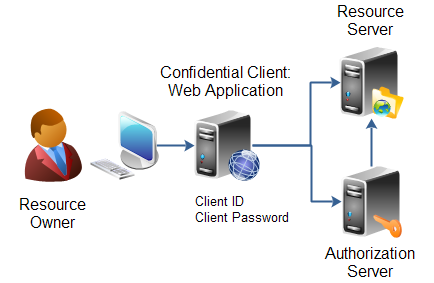
A web program runs on a web server. The client password a web application uses for authorization is stored on the server, so it is confidential. Here is a diagram of a web application:
User Agent Application (Rich Web Client)
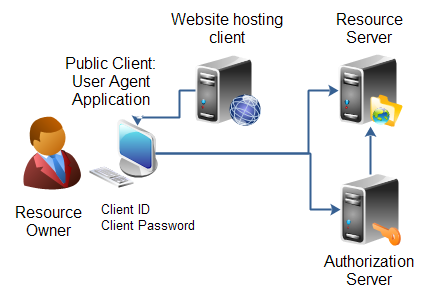
A rich web client is a web application built with JavaScript in which the browser acts as the client agent. Its characteristic is that the program is stored on a web server, but at runtime the browser downloads the JavaScript and executes it locally — for example, browser games written in JavaScript. Here is a diagram of a rich web client:
Native Application
(Note: this refers to applications without a back-end server, so all their data and configuration can only be stored in the client program itself)
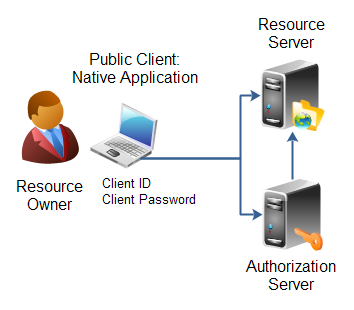
Native applications include mobile apps and desktop programs. They are installed directly on the user’s device (computer, phone, or tablet), and the client password would be stored on the user’s device. Here is a diagram of a native application:
Hybrid Application
These applications usually mix native and web development techniques and typically have a corresponding back-end server. The OAuth 2.0 specification does not mention this type of application; such applications can flexibly choose any of the three types above.
OAuth 2.0 Authorization
- Client ID, Client Secret and Redirect URI
- Authorization Grant
- Authorization Code
- Implicit
- Resource Owner Password Credentials
- Client Credentials
When a client application wants to access resources on a resource server, it must first obtain authorization.
Client ID, Client Secret and Redirect URI
A client application must register with the authorization server. After registration, the authorization server generates the application’s client id and client password. The client_id and client_password are unique within a single authorization server and never duplicated. A client application can register with multiple authorization servers (for example, with Facebook and Google separately), and each authorization server generates a different client_id and client_password for it. When the client application needs to access resources on the resource server, it must first authenticate with the authorization server, sending the corresponding client_id and client_password. When registering with the authorization server, the client application must provide a redirect URL. After the resource owner successfully grants authorization to the client application, the resource owner (simply put, the system user) is redirected to the page specified by that redirect URL.
Authorization Grants
The resource owner grants authorization to the client application, and granting authorization requires cooperation between the authorization server and the resource server.
The OAuth 2.0 specification lists four authorization grant types, each with different security characteristics:
- Authorization Code
- Implicit
- Resource Owner Password Credentials
- Client Credentials
Each grant type is explained below.
Authorization Code
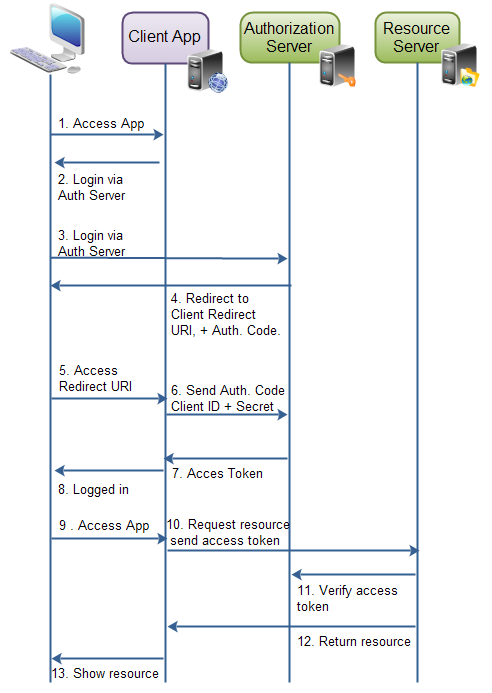
The Authorization Code flow works as follows:
- The resource owner (the user) enters the client application.
- The client application asks the user to log in through the authorization server.
- Before the login, the client application redirects the user to the authorization server’s login page and sends the client id to the authorization server, so the authorization server knows which client application is requesting authorization.
- The user logs in on the authorization server. After a successful login, the user is asked whether to authorize the client application; once the user agrees, they are redirected back to the client application.
- The redirect back to the client application uses the redirect URL the client application provided when registering with the authorization server, and the authorization server sends an authorization code representing this authorization session.
- After the redirect to the client application succeeds, the client application interacts with the authorization server in the background, sending the authorization code obtained in the previous step, together with the client id and client password, to the authorization server.
- The authorization server validates the received data and, if it passes, sends an access token to the client application.
- The client application can then use the received access token to access the relevant resources on the resource server. Here is a diagram:
Implicit
Note: Implicit is deprecated. Under RFC 9700 (OAuth 2.0 Security Best Current Practice) and OAuth 2.1, the implicit grant is deprecated because the access token is exposed directly in the URL fragment of the redirect URL; use the Authorization Code grant with PKCE instead. The protocol explanation below is kept as an introduction to how the grant works.
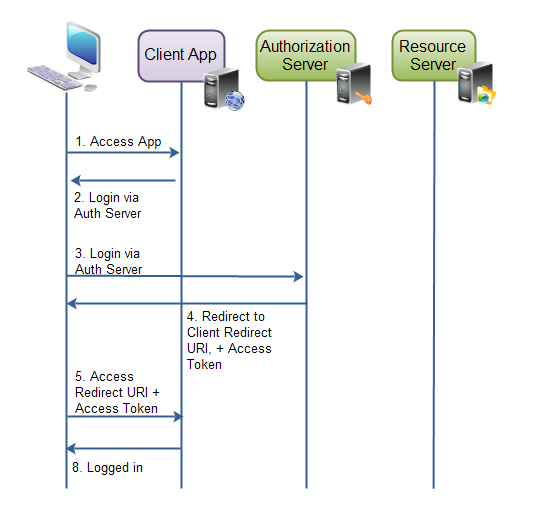
Implicit is similar to Authorization Code; the only difference is that after the user logs in successfully, the access token is returned directly to the client application when redirecting to it. This means the access token is visible in the client application, whereas with Authorization Code the access token stays on the web server and is invisible to the client. This is the biggest difference between the two. Moreover, the client application only sends the client id to the authorization server. If the client password were sent as well, it would have to be stored in the client application, which is a security risk — a client password stored in a client application can easily be obtained through cracking. Here is a diagram:
Resource Owner Password Credentials
Note: Resource Owner Password Credentials is deprecated. Under RFC 9700 (OAuth 2.0 Security Best Current Practice), the password grant has been removed in OAuth 2.1; use the Authorization Code grant with PKCE instead. The protocol explanation below is kept as an introduction to how the grant works.
Resource Owner Password Credentials (the password grant) allows the client application to use the user’s username and password directly. For example, the user can enter their Twitter username and password directly in the client application. The password grant should only be used when the client application is fully trusted. (Since the username and password are entered in the client application, the application can capture and store them.) The password grant is typically used in rich web clients and native applications.
Client Credentials
Client Credentials is used to access resources unrelated to a specific user, so no user authorization is needed.
OAuth 2.0 Endpoints
OAuth 2.0 defines a set of endpoints. An endpoint is generally a URL on a web server. Specifically:
- Authorization endpoint
- Token endpoint
- Redirect endpoint
The authorization endpoint and the token endpoint are on the authorization server, while the redirect endpoint is on the client application. Here is a diagram:
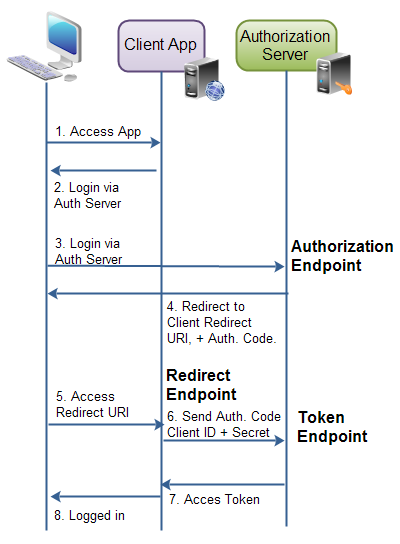
The OAuth 2.0 specification does not define the endpoint URLs explicitly; different implementations provide different URLs.
Authorization Endpoint
The authorization endpoint is the address where the user performs the login.
Token Endpoint
The token endpoint is provided by the authorization server and is where the client application obtains the access token.
Redirect Endpoint
The redirect endpoint is on the client application; after the user logs in successfully, they are redirected to this address.
OAuth 2.0 Requests and Responses
When a client application requests an access token, it sends an HTTP request to the authorization server. Different grant types have different requests and responses. There are four grant types:
- Authorization Code
- Implicit
- Resource Owner Password Credentials
- Client Credentials
The requests and responses of each type are explained in detail below.
OAuth 2.0 Authorization Code Requests and Responses
The authorization code grant has two requests and two responses:
- Authorization request and response
- Access token request and response.
Authorization Request
The authorization request is sent to the authorization server, and an authorization code is obtained.
response_type 	Required. Fixed value "code"
client_id 	Required. The client id generated when the client application registered with the authorization server.
redirect_uri 	Optional. The redirect URL the client application provided when registering with the authorization server.
scope 	Optional. The scope of the requested permissions.
state 	Required (to prevent CSRF attacks, as required by the current best current practice RFC 9700). A parameter in the client application's request URL; it can be any value.
Authorization Response
The authorization response contains the authorization code, which must be provided later when obtaining the access token.
code 	Required. The authorization code returned by the authorization server.
state 	Required, if the client application's request contained this parameter; the value is the same as the state parameter sent in the request.
Authorization Error Response
There are two kinds of authorization errors.
The first is client application verification failure, for example when the redirect URL sent in the authorization request does not match the URL the client application provided when registering with the authorization server.
The second is any other error, in which case the following error information is returned to the client application:
error 	Required. Must be one of a set of predefined error codes. See the specification for the codes and their meaning.
error_description 	Optional. A human-readable UTF-8 encoded text describing the error. Intended for a developer, not an end user.
error_uri 	Optional. A URI pointing to a human-readable web page with information about the error.
state 	Required, if present in authorization request. The same value as sent in the state parameter in the request.
Token Request
After obtaining the authorization code, the client application can use it to get an access token. The request parameters are as follows:
client_id 	Required. The client application's id.
client_secret 	Required. The client application's client secret .
grant_type 	Required. Must be set to authorization_code .
code 	Required. The authorization code received by the authorization server.
redirect_uri 	Required, if the request URI was included in the authorization request. Must be identical then.
Token Response
The access token response is in JSON format:
{ "access_token"  : "...",
  "token_type"    : "...",
  "expires_in"    : "...",
  "refresh_token" : "...",
}
access_token : the access token, token_type : the token type, usually bearer, expires_in : the token’s expiry time in seconds, refresh_token : when the access token expires, the refresh token can be used to obtain a new access token
OAuth 2.0 Implicit Requests and Responses
The implicit grant has only one request and one response.
Implicit Authorization Request
The request parameters are as follows:
response_type 	Required. Must be set to token .
client_id 	Required. The client identifier as assigned by the authorization server, when the client was registered.
redirect_uri 	Optional. The redirect URI registered by the client.
scope 	Optional. The possible scope of the request.
state 	Required (to prevent CSRF attacks, as required by the current best current practice RFC 9700). Any client state that needs to be passed on to the client request URI.
Implicit Authorization Response
The response contains the following parameters; note that it is not in JSON format.
access_token 	Required. The access token assigned by the authorization server.
token_type 	Required. The type of the token
expires_in 	Recommended. A number of seconds after which the access token expires.
scope 	Optional. The scope of the access token.
state 	Required, if present in the autorization request. Must be same value as state parameter in request.
Implicit Error Response
Two situations can cause an error: The first is client application verification failure, for example when the redirect URL sent in the authorization request does not match the URL the client application provided when registering with the authorization server.
The second is any other error, in which case the following error information is returned to the client application:
error 	Required. Must be one of a set of predefined error codes. See the specification for the codes and their meaning.
error_description 	Optional. A human-readable UTF-8 encoded text describing the error. Intended for a developer, not an end user.
error_uri 	Optional. A URI pointing to a human-readable web page with information about the error.
state 	Required, if present in authorization request. The same value as sent in the state parameter in the request.
Resource Owner Password Credentials Requests and Responses
The password grant has only one request and one response.
Resource Owner Password Credentials Request
The request contains the following parameters:
grant_type 	Required. Fixed value "password"
username 	Required. UTF-8 encoded username.
password 	Required. UTF-8 encoded password.
scope 	Optional. The scope of the requested permissions.
Resource Owner Password Credentials Response
The response is in JSON format:
{ "access_token"  : "...",
  "token_type"    : "...",
  "expires_in"    : "...",
  "refresh_token" : "...",
}
access_token : the access token, token_type : the token type, expires_in : the token’s expiry time in seconds, refresh_token : when the access token expires, the refresh token can be used to obtain a new access token
Client Credentials Requests and Responses
Client Credentials Request
The request contains the following parameters:
grant_type 	Required. Fixed value "client_credentials".
scope 	Optional. The scope of the requested permissions.
Client Credentials Response
The response contains the following parameters:
{ "access_token"  : "...",
  "token_type"    : "...",
  "expires_in"    : "...",
}
access_token : the access token, token_type : the token type, expires_in : the token’s expiry time in seconds, Note that this grant type has no refresh_token